Notes & documentation

Thirteen note templates or your own, typed or dictated or recorded, diagnoses with ICD-10 codes, a sign queue, and a locked, versioned record you can export at any time.

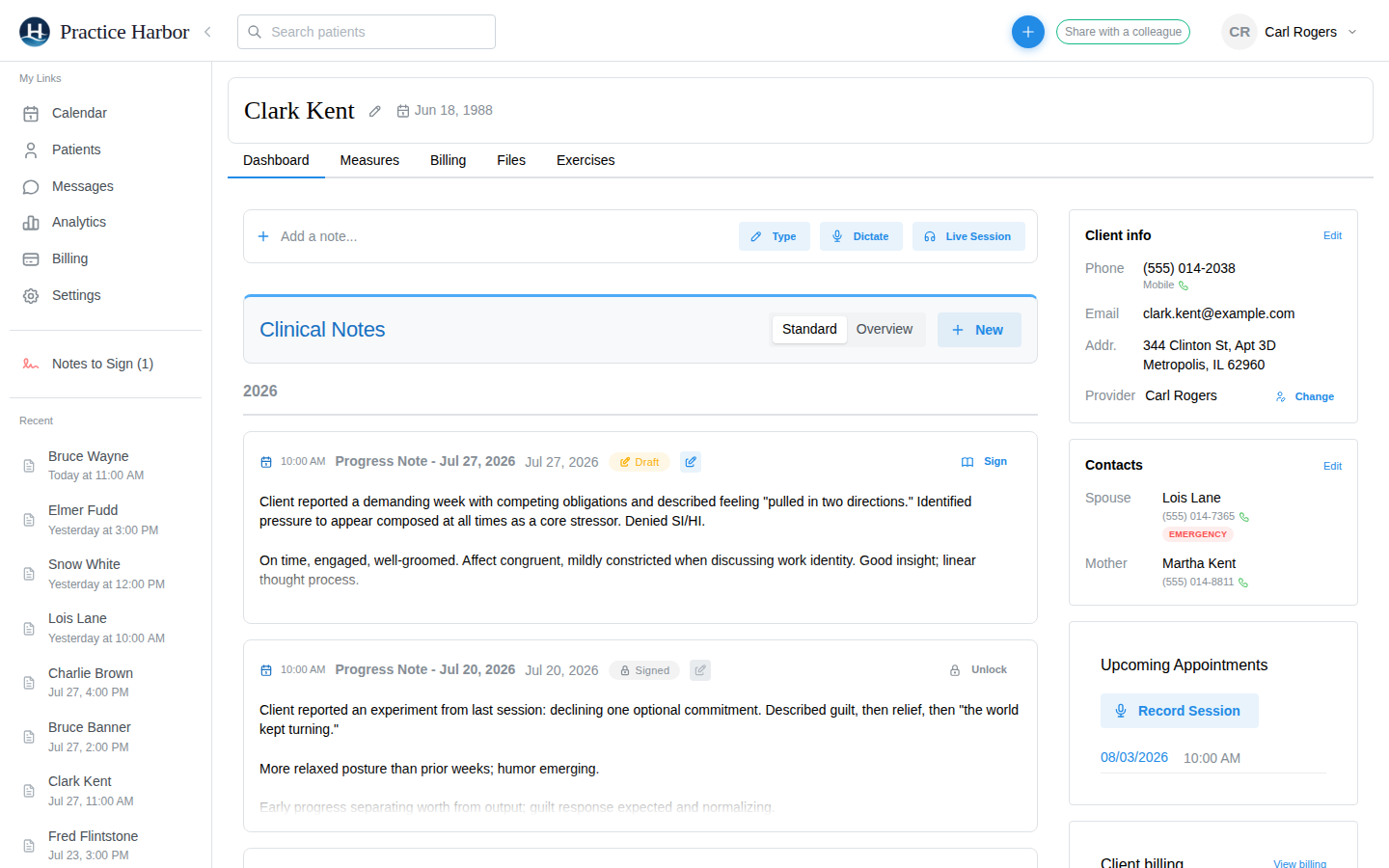
Draft and signed progress notes on a client chart

A chart that holds everything

Templates for every kind of session

Therapy intake and follow-up, couples, family, and group; SOAP, DAP, BIRP, GIRP, and PIRP; supervision note, discharge summary, and crisis note. Add any to your library as is, customize its sections, or build your own and make it the default.
Three ways to start a note

Type, Dictate, or Live Session from the note bar on every chart. A typed note is structured into your template by AI; dictation and recording draft the whole note for you to review.

Sign, lock, and correct with an audit trail

Notes to Sign lists every unsigned note and unsigned treatment plan with how long it has waited. Signing locks the note; unlocking to correct it records who changed what and when, and every version of a client record is kept.

Diagnoses with ICD-10 codes

Search by code or keyword, add several diagnoses to one entry, sign it, and the codes flow onto claims and superbills. Multiple diagnoses are supported on both.

Paperwork and files on the chart

Completed intake forms, signed consents, and scored measures land on the client’s Files tab as PDFs, alongside anything you upload. Administrative notes and quick chart notes sit beside the clinical record without becoming part of it.

Export at any time

A client’s complete record exports as a zip of PDFs, with the raw FHIR R4 data as JSON if you want it, for a records request, a referral, or a move to another system.

HIPAA compliant BAA included at sign-up Encrypted in transit and at rest

Common questions

Can I use my own note template?

Yes. Build it from scratch under Settings, Templates, or duplicate one of the thirteen built-in templates and change its sections. Set any template as your default.

Are notes locked after signing?

Yes. A signed note is locked. To correct it you unlock it, which keeps the earlier version and records who made the change and when.

Who can read my notes in a group practice?

That depends on the role you give each team member. Clinician access levels run from your own clients only to the entire practice; administrative roles can read notes but never write or sign them.

More answers in the help center.

Start for free

Try every feature free, with no credit card. Your Business Associate Agreement is signed the moment you create your account.

Start free trial