Billing & payments

Invoices, statements, and superbills built from the appointments you already keep, cards on file with AutoPay, and flat card processing at 3.15% plus 30 cents.

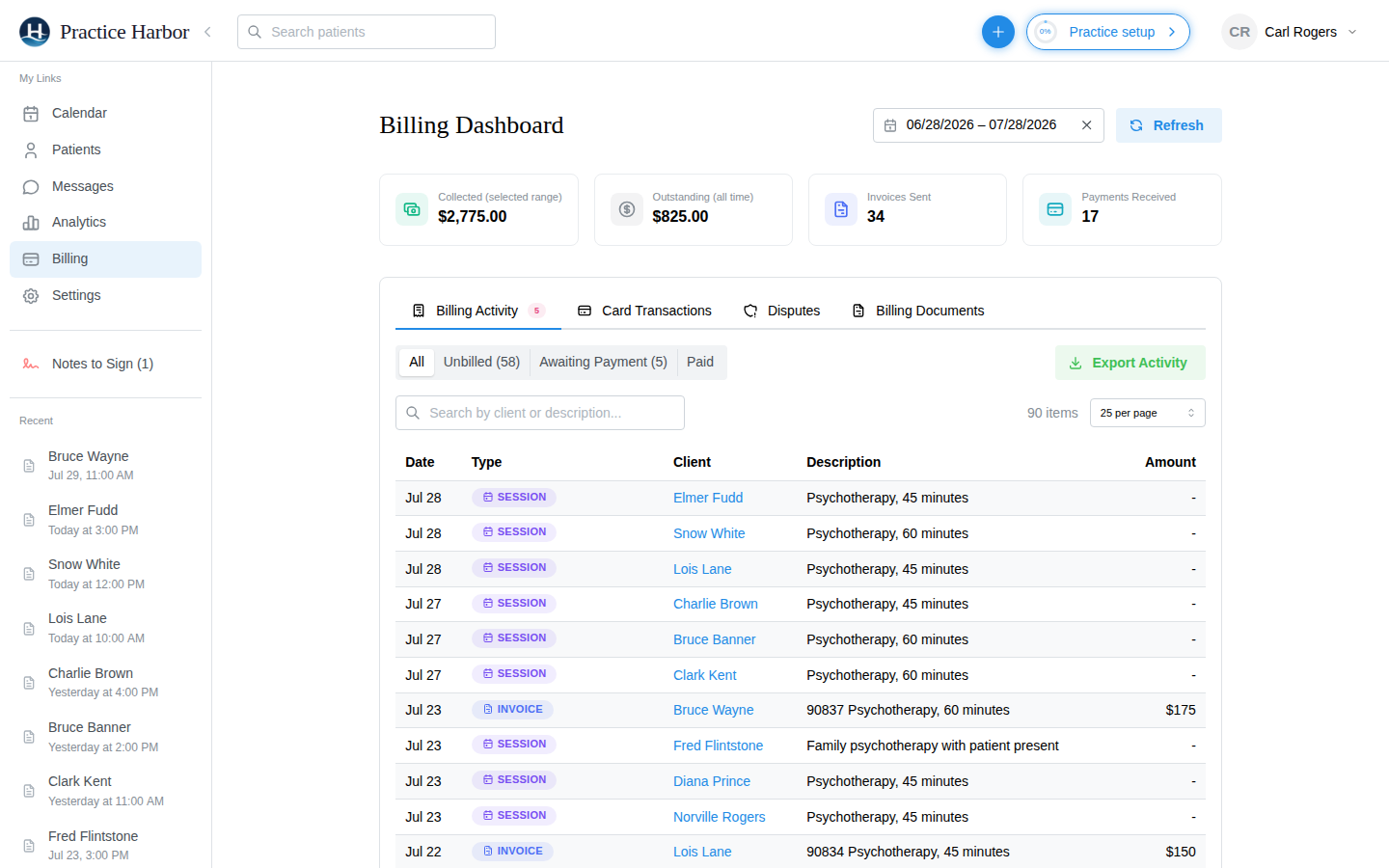
The billing dashboard in Practice Harbor

Get paid without chasing

Cards on file and AutoPay

Collect a card during intake and enroll the client. Every night AutoPay looks at each enrolled client’s issued invoices, applies any credit first, and charges the rest to the saved card. Failed charges are listed for you to follow up.
Invoices and statements

Create an invoice from the appointment, the client’s billing tab, or the dashboard, or turn on automatic daily invoicing and let sessions invoice themselves. Monthly statements can go out on their own, per client.

Superbills for out-of-network clients

Provider details and NPI, dates of service, CPT codes, ICD-10 diagnoses, and charges in the format payers expect. Generate one in a click or email them monthly, with a supervisor’s details added for pre-licensed clinicians.

Every way money arrives

Charge the card on file, take a one-time card such as an HSA or FSA card, or record cash, a check, or a payment collected elsewhere. Refund a card charge within 180 days; apply unallocated credit before charging anything.

A dashboard that reads like a bookkeeper’s

Collected, outstanding, invoices sent, and payments received for any date range, an Unbilled filter for sessions that happened but haven’t been invoiced, card transactions and disputes, and CSV export.

Self-pay and insurance side by side

Each client has a billing type and their own defaults: service code, rate, and modifiers that pre-fill when you schedule. Insurance clients split automatically into insurance and client responsibility.

HIPAA compliant BAA included at sign-up Encrypted in transit and at rest

Common questions

What does card processing cost?

3.15% plus 30 cents per card payment, paid to your own Stripe account. There is no monthly processing fee and no separate merchant account to set up.

Can clients pay from the portal?

Yes. The portal’s Billing area shows invoices with Pay Now, superbills to download, payment history, saved cards, and AutoPay status.

Do you take HSA and FSA cards?

Yes, as a one-time charge. HSA and FSA cards generally can’t be stored on file, so the modal takes the card details for that payment and keeps nothing.

Can I record cash and checks?

Yes. Cash, checks with the check number, and payments taken through another processor are recorded with their date so income reports count them in the right period.

More answers in the help center.

Start for free

Try every feature free, with no credit card. Your Business Associate Agreement is signed the moment you create your account.

Start free trial