AI progress notes

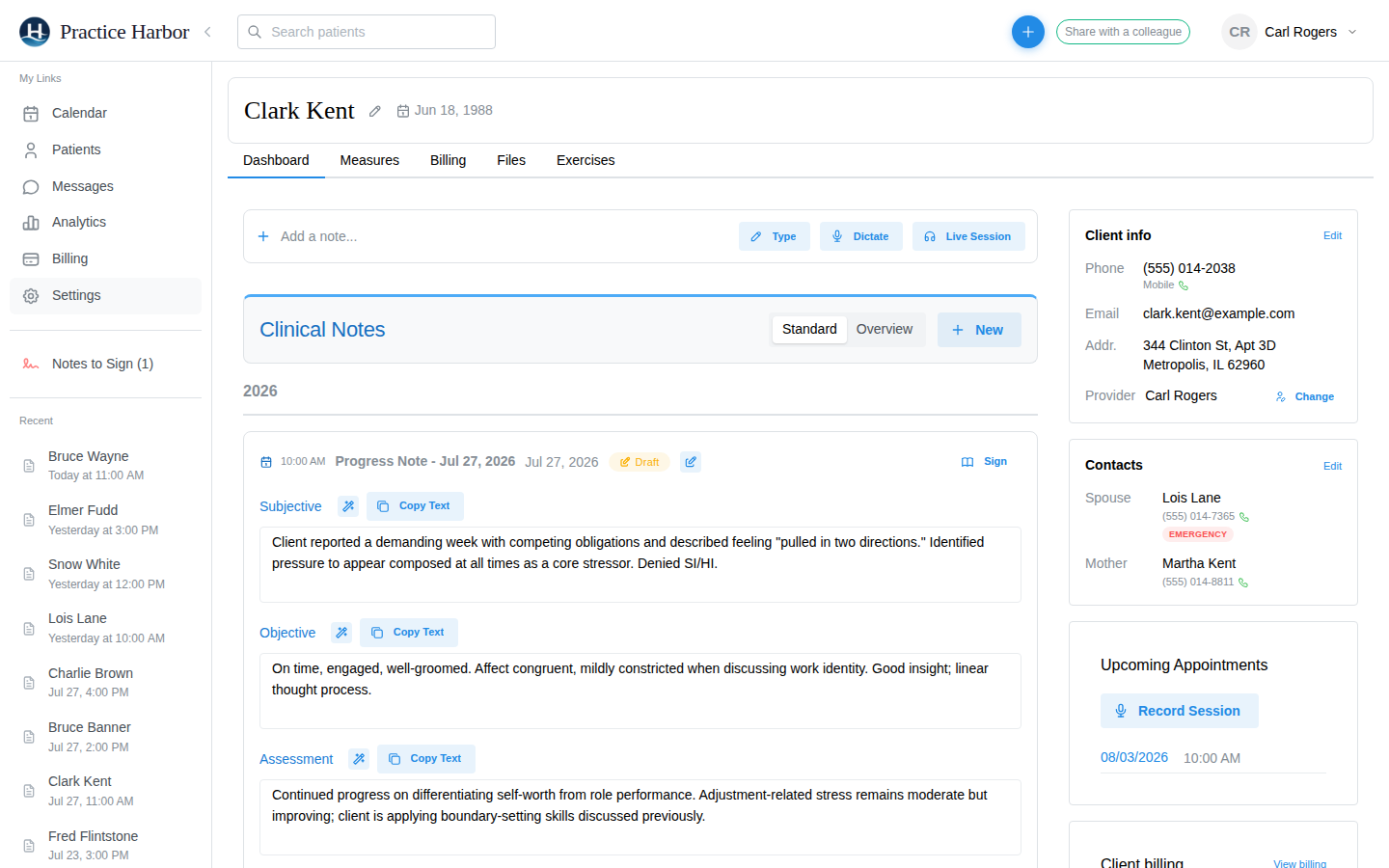
Record the session, or dictate a few lines after it, and Practice Harbor drafts a progress note in your template and your clinical voice. You review, edit, and sign.

A progress note drafted by AI in Practice Harbor

Documentation that keeps up with your day

Record the session, or dictate after it

Live Session records an in-person or telehealth session of up to 150 minutes; audio uploads while you talk and transcription starts the moment you end. Prefer not to record? Dictate a summary in your own words afterwards and the AI structures it into your template.
Your template, your format

Thirteen built-in templates: SOAP, DAP, BIRP, GIRP, PIRP, therapy intake, follow-up, couples, family, group, supervision note, discharge summary, and crisis note. Customize any section or build your own from scratch and set it as your default.

Magic Edit for the parts you want changed

Click the wand on any section and say what you want: "make this more concise", "add that we discussed medication adherence", "use neutral clinical language". The rewrite stays grounded in the session transcript when there is one.

Ask Cora about the whole chart

Ask a question about a client and get an answer drawn from every note, score, and medication in their record, with the session date it came from. Conversations are never saved; the record stays exactly what you wrote.

Nothing files without your signature

A draft stays a draft until you sign it. The Notes to Sign queue shows what is waiting and for how long, signed notes lock, and a correction reopens the note with an audit trail. Supervisees submit for review and supervisors co-sign.

Private by design

Transcription and drafting run under Business Associate Agreements with zero data retention. No audio or transcript is used to train AI models, audio is not kept beyond transcription, and a De-identify Names setting replaces names with roles in the generated note.

HIPAA compliant BAA included at sign-up Encrypted in transit and at rest

Common questions

Will the AI write notes that sound like me?

It drafts from what was said in the session and the template you chose, and you can adjust its register with Magic Edit. You review and sign every note, so think of it as a fast scribe rather than a replacement for your clinical judgment.

Is session audio used to train AI models?

No. Transcription and drafting run under Business Associate Agreements with zero data retention, audio is not kept beyond transcription, and nothing from your sessions trains any model.

Does it work for telehealth sessions?

Yes. In the built-in video room the Start Notes toggle records with the client’s consent and drafts the note when the call ends. If you use Live Session with headphones, switch on Telehealth with Headphones so the client’s audio is captured.

What about couples, families, and groups?

Couples and family sessions work like a 1:1 session: the note uses your couples or family template and files on the shared chart. Roster therapy groups are documented per member from the Group Note composer, without a recording.

More answers in the help center.

Start for free

Try every feature free, with no credit card. Your Business Associate Agreement is signed the moment you create your account.

Start free trial